
The Master Workflow: Your Complete Implementation Manual for Peak Productivity
Real-World Application to Maximize Every Minute of Your Day

In today’s hyperconnected work environment, the challenge isn’t workload—it’s information management. Traditional productivity advice like “just try harder” fails because willpower is unreliable.
Purposemaker Labs introduces The Master Workflow, a system blending principles from Getting Things Done (David Allen) , Make Time (Jake Knapp) , and Building a Second Brain (Tiago Forte).
It categorizes peak-performance principles into four actionable steps that prevent information loss, maximize execution, and make productivity predictable—even on your worst days.
Why Most Productivity Systems Fail
Willpower is unreliable – see Atomic Habits for how systems outperform motivation.
Systems enable worst-day performance – they work when energy and focus fail.
Short-term discomfort < long-term stress – setup friction avoids long-term chaos.
Principle: Systems compound; willpower decays.
The Four Types of Workplace Information
Tasks – Action items requiring completion.
Ideas – Original thoughts worth capturing.
Notes – External inputs: meetings, readings, research.
Media – Digital files and documents.
See Tiago Forte’s Second Brain PARA method for structuring these into Projects, Areas, Resources, and Archives.
The Core Workflow: Four Steps
Step 1: CAPTURE
Brains are poor storage devices. Externalize everything (see Getting Things Done guide on Todoist ).
Use tools like Google Keep, Apple Notes, or Todoist.
Capture within 30 seconds. Minimal input, maximum velocity.
Example: VP request → “Schedule Japan market slides, due Thursday QBR – Prrisca.”
Step 2: ORGANIZE
Lightweight categories prevent overthinking.
Distinguish “temporary inbox” (Keep, Drafts) vs. “reference library” (Notion productivity workspace , Google Docs, OneNote ).
Assign due dates and tags immediately.
Step 3: REVIEW
Unreviewed capture = digital clutter.
Block three 30‑minute daily reviews.
Morning: calendar + task inbox
Post‑lunch: email + notes
Evening: next‑day prep
For scheduling, see Google Workspace productivity guide.
For Notes workflow, review Apple productivity apps guide.
Step 4: ENGAGE
Protect calendar time for deep work.
Execute, document, and archive.
Use negotiation preparation as a real‑world application:
Listen to a podcast → capture idea
Organize and time-block rehearsal
Use Chris Voss negotiation tactics such as mirroring and tactical empathy
Outcome: controlled execution, not reactive chaos.
Tool Selection (Platform‑Agnostic)
Works perfectly across:
Apple ecosystem: Reminders, Notes, and Shortcuts guide
Third‑party: Notion productivity blueprint , Obsidian PKM workspace, TickTick.
Selection criteria: capture speed (<10s), reliable sync, calendar integration, tagging support.
Implementation Timeline
Week 1: Practice capture only.
Week 2: Add tags/due dates.
Week 3: Full 3‑block review habit.
Week 4: Calibrate time‑blocking accuracy.
Target: second‑nature execution in 14 days.
Common Implementation Failures
“This feels like extra work.” → It compounds efficiency.
“I’ll remember it.” → Human recall fails under load; see GTD principles.
“Too many tools.” → Minimum viable stack = capture + calendar + storage.
Automation example: Google Drive file organization scripts (reduces media sorting).
Success Metrics (90 Days)
Missed deadlines → 0
Forgotten commitments → 0
File-search time → −50%
Task completion rate → 80%+
Review stress → decreasing trend
Track with Notion dashboards or Google Sheets KPI templates.
Next Steps
Choose universal capture tool.
Schedule 3 daily review blocks.
Capture everything for 7 days.
Review routinely.
Block focused execution time.
Core principle: Capture fast. Organize clearly. Review consistently. Engage intentionally.
Tools vary; workflow endures.
The Master Workflow: Expert FAQ
Your Complete Reference for Peak Productivity – Purposemaker Labs
1. What problem does The Master Workflow solve?
In today’s hyperconnected work environment, the challenge isn’t workload—it’s information management. Traditional advice like “just try harder” fails because willpower is unreliable. The Master Workflow prevents information loss, maximizes execution, and makes productivity predictable—even on your worst days.
2. How is this system different from other productivity methods?
It blends principles from Getting Things Done (David Allen), Make Time (Jake Knapp), and Building a Second Brain (Tiago Forte) into a four-step workflow:
Capture – Externalize ideas, tasks, and media instantly.
Organize – Assign due dates, tags, and storage locations efficiently.
Review – Three daily reviews prevent digital clutter.
Engage – Execute with focus, block distractions, and archive outputs.
Unlike methods reliant on willpower, this system works even when energy and focus fail.
3. Why do most productivity systems fail?
Willpower decays: Systems compound; motivation fades (see Atomic Habits).
Lack of worst-day performance: Without systems, productivity collapses under stress.
Short-term discomfort vs. long-term chaos: Friction in setup prevents future overwhelm.
4. What types of information should I manage?
The Master Workflow handles four categories:
Tasks: Action items requiring completion.
Ideas: Original thoughts worth capturing.
Notes: External inputs like meetings, research, or readings.
Media: Digital files, documents, or assets.
Structure them using Tiago Forte’s PARA method: Projects, Areas, Resources, Archives.
5. How do I implement the four steps effectively?
Step 1: Capture
Use tools like Todoist, Google Keep, Apple Notes.
Capture within 30 seconds—minimal input, maximum velocity.
Example: “Schedule Japan market slides, due Thursday QBR – Prissca.”
Step 2: Organize
Separate temporary inbox vs. reference library.
Assign due dates, tags, and storage location immediately.
Tools: Notion, Google Docs, OneNote.
Step 3: Review
Block three 30-minute daily reviews:
Morning: Calendar + tasks
Post-lunch: Email + notes
Evening: Next-day prep
Reference: Google Workspace productivity guide, Apple productivity apps guide.
Step 4: Engage
Protect calendar for deep work.
Execute, document, and archive.
Example: Podcast → capture idea → organize → time-block → rehearse → apply Chris Voss negotiation tactics.
6. Which tools work best?
Platform-agnostic approach:
Google Workspace: Docs, Sheets, Calendar
Apple ecosystem: Reminders, Notes, Shortcuts
Microsoft 365: OneNote, To-Do
Third-party: Notion, Obsidian, TickTick
Selection criteria:
Capture speed <10 seconds
Reliable sync
Calendar integration
Tagging support
7. How quickly can I implement this system?
14-day ramp-up plan:
Week 1: Practice capture only
Week 2: Add tags/due dates
Week 3: Full 3-block review habit
Week 4: Calibrate time-blocking accuracy
Target: second-nature execution in 14 days.
8. What are common implementation pitfalls?
“This feels like extra work” → it compounds efficiency.
“I’ll remember it” → human recall fails under load (see GTD).
“Too many tools” → minimum viable stack = capture + calendar + storage.
Automation tip: Use Google Drive scripts to reduce media sorting.
9. How do I measure success?
Track metrics over 90 days:
Missed deadlines → 0
Forgotten commitments → 0
File-search time → −50%
Task completion rate → 80%+
Review stress → decreasing trend
Use Notion dashboards or Google Sheets KPI templates.
10. What are the first steps to get started?
Choose a universal capture tool.
Schedule three daily review blocks.
Capture everything for 7 days.
Review routinely.
Block focused execution time.
Core principle: Capture fast. Organize clearly. Review consistently. Engage intentionally.
Tools may vary; workflow endures.
Additional Expert Enhancements
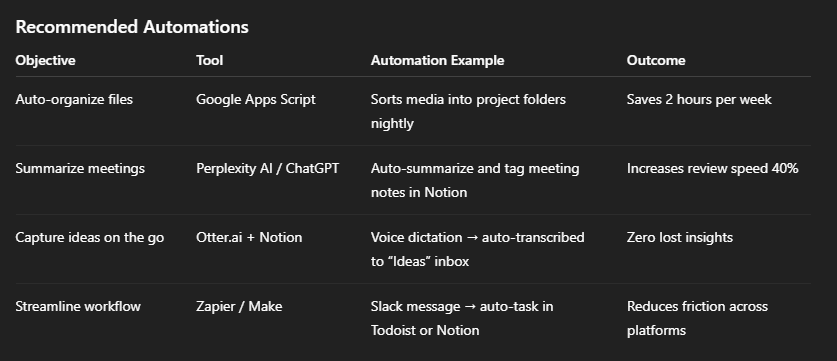
Automation Layer: AI + Integration Stack
Modern workflows demand intelligent leverage. By integrating automation and AI tools, you transform The Master Workflow from a manual routine into a self-optimizing ecosystem.
Recommended Automations
Implementation Tip
Start with one automation per week.
Each should either reduce manual sorting, accelerate capture, or eliminate context switching.
Behavioral Reinforcement
Even the most elegant systems fail without behavioral reinforcement. The Master Workflow thrives on ritual consistency, not motivation.
System Anchors
Cue: Pair daily review with an existing routine (morning coffee or post-lunch break).
Reward: End each review with a short dopamine-positive ritual—music, walk, or small treat.
Reflection: Weekly self-audit—“Did I capture, organize, and review consistently?”
Recovery Rule: Never skip two system engagements in a row.
As James Clear notes in Atomic Habits, environment design beats willpower. Make your workflow frictionless to start and satisfying to sustain.
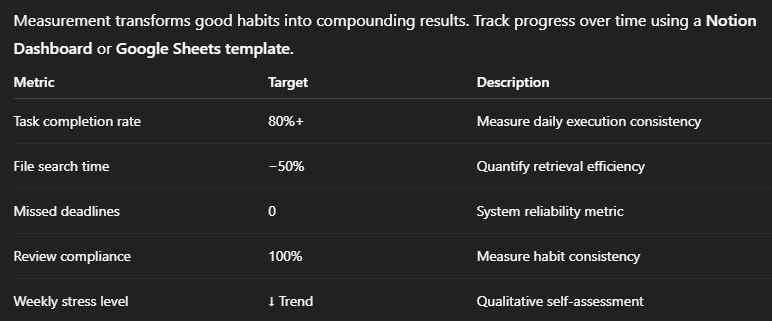
Metrics Dashboard Template
Automation Suggestion
Integrate Notion or Sheets with Google Calendar to automatically log completed tasks and review blocks. This enables long-term trend visualization.
Case Study: The 7-Day Change Process
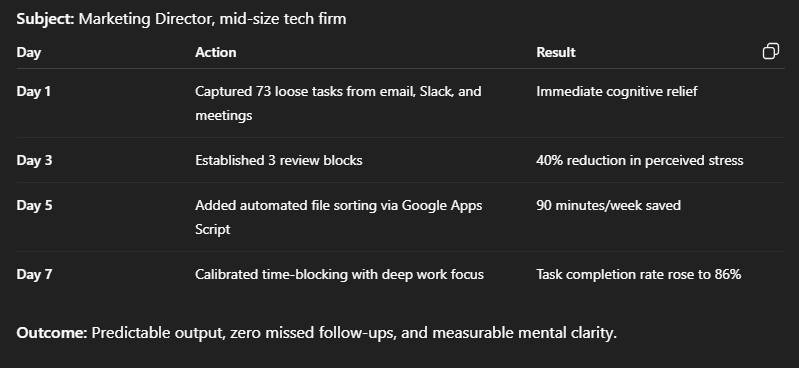
Outcome: Predictable output, zero missed follow-ups, and measurable mental clarity.
Quarterly Optimization Review
Productivity systems decay without recalibration. Schedule a Quarterly Optimization Review to refine, simplify, and strengthen your workflow.
Quarterly Review Checklist
Review top 3 recurring task types; eliminate redundancy.
Audit all tags, folders, and archives—remove outdated ones.
Refresh automation rules and integrations.
Assess review frequency—adjust timing or duration.
Document one insight: “What bottleneck emerged this quarter?”
Align workflow focus with current professional goals.
Result: sustained clarity, not creeping complexity.
Principles Summary Card
To internalize the system, Purposemaker Labs recommends keeping the Principles Summary Card visible in your workspace.
The Master Workflow Principles
Capture everything → empty mind = focused mind.
Organize once → decide once.
Review daily → maintain control.
Engage deeply → output compounds.
Recovery = resilience, not repair.
Tools change. Workflow endures.
Print this, pin it to your workspace, or embed it as a Notion widget for constant reinforcement.
Key Takeaway Summary
Automation Layer – AI integrations eliminate friction.
Behavioral Reinforcement – rituals replace willpower.
Metrics Dashboard – track performance objectively.
Case Study Proof – validate system impact in 7 days.
Quarterly Optimization – keep your system adaptive.
Starter Kit & Summary Card – ensure fast adoption and lasting mastery.
Final Insight:
Perfect systems don’t exist—resilient systems adapt.
When implemented fully, The Master Workflow doesn’t just increase productivity—it builds operational excellence you can depend on, even on your worst days.
Perfect systems fail. Resilient systems recover.
Workflow interruptions do not indicate personal failure. They indicate normal operational variance. Recovery protocols are not emergency measures—they are standard operating procedures for sustainable productivity.
Couldn't agree more; what if our mental RAM fills up just trying to decide how to capture?